Elcomsoft Phone Viewer5.40.39064
Publisher Description
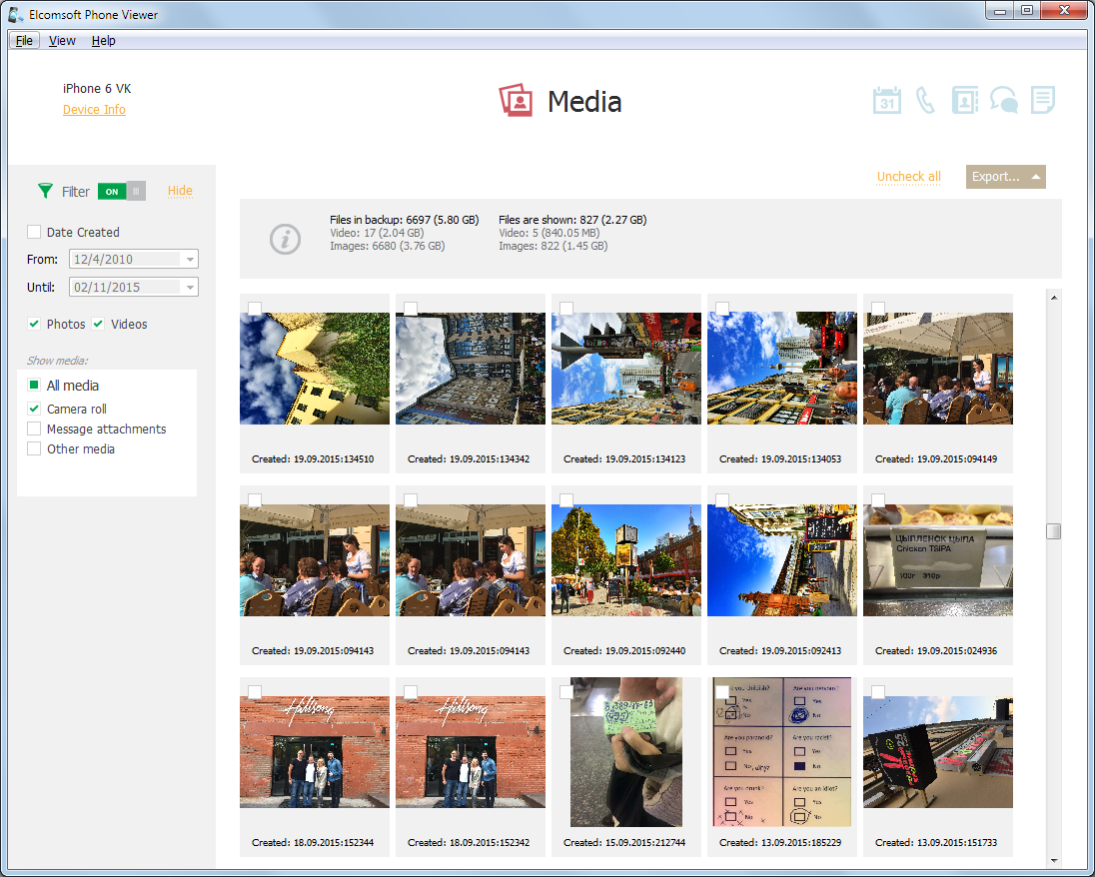
Elcomsoft Phone Viewer is a fast, lightweight forensic viewer for quickly accessing information extracted from mobile devices, backups and cloud services. Supporting a variety of platforms and data formats, the tool can display information extracted from local and cloud iOS backups and data synchronized to Apple iCloud. Password-protected iTunes backups can be automatically decrypted and analyzed without using third-party tools.
Elcomsoft Phone Viewer is a perfect companion for the range of ElcomSoft mobile forensic tools, offering the ability to view information extracted via physical, logical or over-the-air acquisition. Elcomsoft Phone Viewer supports all types of backups and synced data pulled from a variety of local and cloud sources, and supports all versions of iOS including the latest builds.
Users of Elcomsoft Phone Breaker can easily view and analyze extracted information in Elcomsoft Phone Viewer. Investigators can instantly access information about the suspects activities such as their calls, messages, address books and location history in a matter of minutes. You can view both existing and deleted records. The tool can export digital evidence collected from iOS device backups, iCloud and file system images to Microsoft Excel.
The tool is a perfect stand-alone forensic viewer and a great tool for lightweight forensic analysis. Directly supporting password-protected offline backups produced by Apple iTunes, Elcomsoft Phone Viewer can immediately display information from encrypted backups without requiring Elcomsoft Phone Breaker or another tool to decrypt the backup first. While Elcomsoft Phone Viewer will not break an unknown password (one still has to use Elcomsoft Phone Breaker for that), pre-decrypting offline backups is not required.
The tool can display bookmarks, search and browsing history along with snapshots of opened browser tabs, media and photo libraries, offering convenient access to media galleries with large numbers of files.
About Elcomsoft Phone Viewer
This Backup & Restore program is available in English. It was last updated on 29 September, 2026. Elcomsoft Phone Viewer is compatible with the following operating systems: Windows.
The company that develops Elcomsoft Phone Viewer is ElcomSoft Co. Ltd.. The latest version released by its developer is 5.40.39064. This version was rated by 11 users of our site and has an average rating of 2.0.
The download we have available for Elcomsoft Phone Viewer has a file size of 154.1 MB. Just click the green Download button above to start the downloading process. The program is listed on our website since 2023-02-10 and was downloaded 1,045 times. We have already checked if the download link is safe, however for your own protection we recommend that you scan the downloaded software with your antivirus. Your antivirus may detect the Elcomsoft Phone Viewer as malware if the download link is broken.
How to install Elcomsoft Phone Viewer on your Windows device:
- Click on the Download button on our website. This will start the download from the website of the developer.
- Once the Elcomsoft Phone Viewer is downloaded click on it to start the setup process (assuming you are on a desktop computer).
- When the installation is finished you should be able to see and run the program.
Program Details
System requirements
Download information
Pricing
Version History
version 5.40.39058
posted on 2023-02-10
Minor bug fixes and improvements
version 5.40
posted on 2022-12-20
Added support for iOS 16 backups and full file system images
Fixed several issues with certain data categories in iOS 15 backups
Better parsing of geolocations (from system files and thumbnails)
Improved backup selection (displays device information before opening)
version 5.33.37390
posted on 2022-03-18
Added support for macOS 12 Monterey.
Added support for Windows 11.
Fixed multiple data export problems.
version 5.32.37313
posted on 2021-10-04
Fixed the problem with Skype attachments (macOS version only).
Added support for .rar files obtained with checkm8 acquisition method in Oxygen Forensic Detective.
A number of small bug fixes and internal improvements.
version 5.30
posted on 2021-06-15
Support for new Microsoft accounts data: Apps and services, recent OneDrive files list, OneDrive files
Removed media files that have zero size
Improved location history parsing for iOS 14 backups and file system images
Multiple Wi-Fi connection data improvements: removing duplicates, iOS 14 fixes
version 5.20.37270
posted on 2020-10-08
Enhancements:
Preliminary support for iOS 14 backups
Support for .tar files created with Magnet AXIOM Acquire
Improved Wi-Fi connections parsing
Fixes:
Processing media files under certain circumstances
Parsing of notes attachments
Data export when the path contains non-latin characters
version 5.20.37270
posted on 2020-10-08
Fixes:
Processing media files under certain circumstances
Parsing of notes attachments
Data export when the path contains non-latin characters
Enhancements:
Preliminary support for iOS 14 backups
Support for .tar files created with Magnet AXIOM Acquire
Improved Wi-Fi connections parsing
version 5.20
posted on 2020-10-08
Added preliminary support for iOS 14 backups
Added support for .tar files created with Magnet AXIOM Acquire
Improved Wi-Fi connections parsing
Fixed processing media files under certain circumstances
Fixed parsing notes attachments
Fixed data export when the path contains non-latin characters
version 5.10.36812
posted on 2020-06-11
Clearing program test folder with temporary data.
Fixed crash on Windows 7 on backup processing.
Fixed program hang on "Counting files for decryption".
Added support for new synced iCloud data downloaded by EPB.
Added keychain viewer (Forensic edition only).
Minor fixes and improvements in UI.
version 5.10
posted on 2020-06-11
Added support for new synced iCloud data downloaded by EPB
Added keychain viewer (Forensic edition only)
Shows contact names in calls and names near phone numbers in Signal chats
Fixed date/time processing for messages and calls in Signal chats
Fixed crash on data export from main Windows
